
On October 29, I built DeMetal AI 1.0, a plugin for FL Studio, with Claude in a single day, and released version 1.1 the next day. Part 1 explained why someone at a company that patented AI-music detection decided to build a tool that does the opposite and removes the metallic sound. This part covers how the plugin reads sound and what it reduces, and the three problems that appeared as soon as I used it on my own songs.
Version 1.0 in a day: how it was built
Six bands
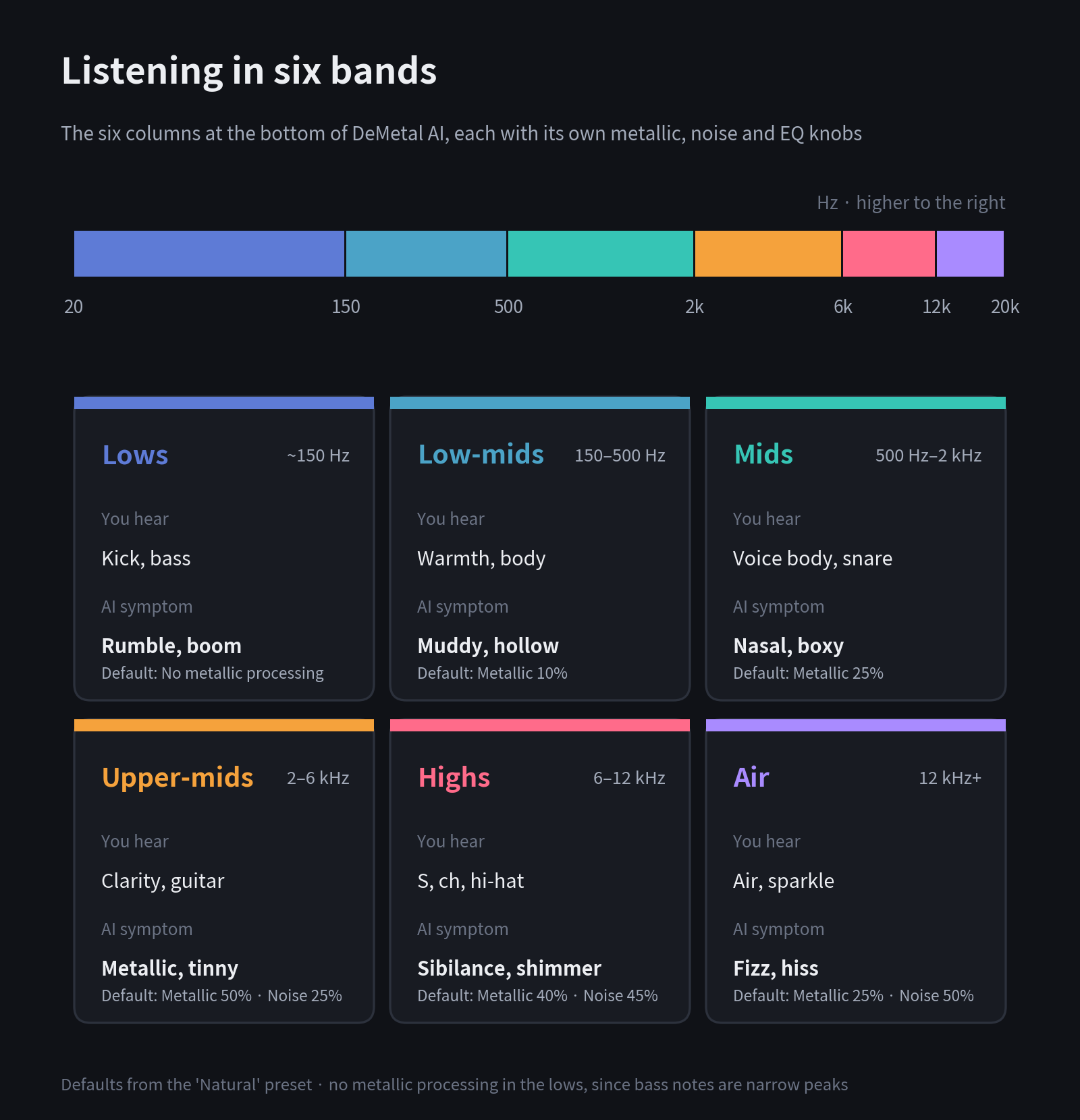
The bottom of the window has six columns. They divide the sound into six bands, from the lows up to the very top. Each column has its own knobs for metallic sound, noise and EQ, and a meter that shows how much it found in that band. The idea is to let you see where the problem is before you turn anything.
There is no metallic-sound processing below 150 Hz. Bass notes are narrow peaks by nature, so a machine cannot tell them apart from resonances. The lows are handled only with EQ, a low cut and a mono bass setting.
Slicing sound into 0.04-second pieces
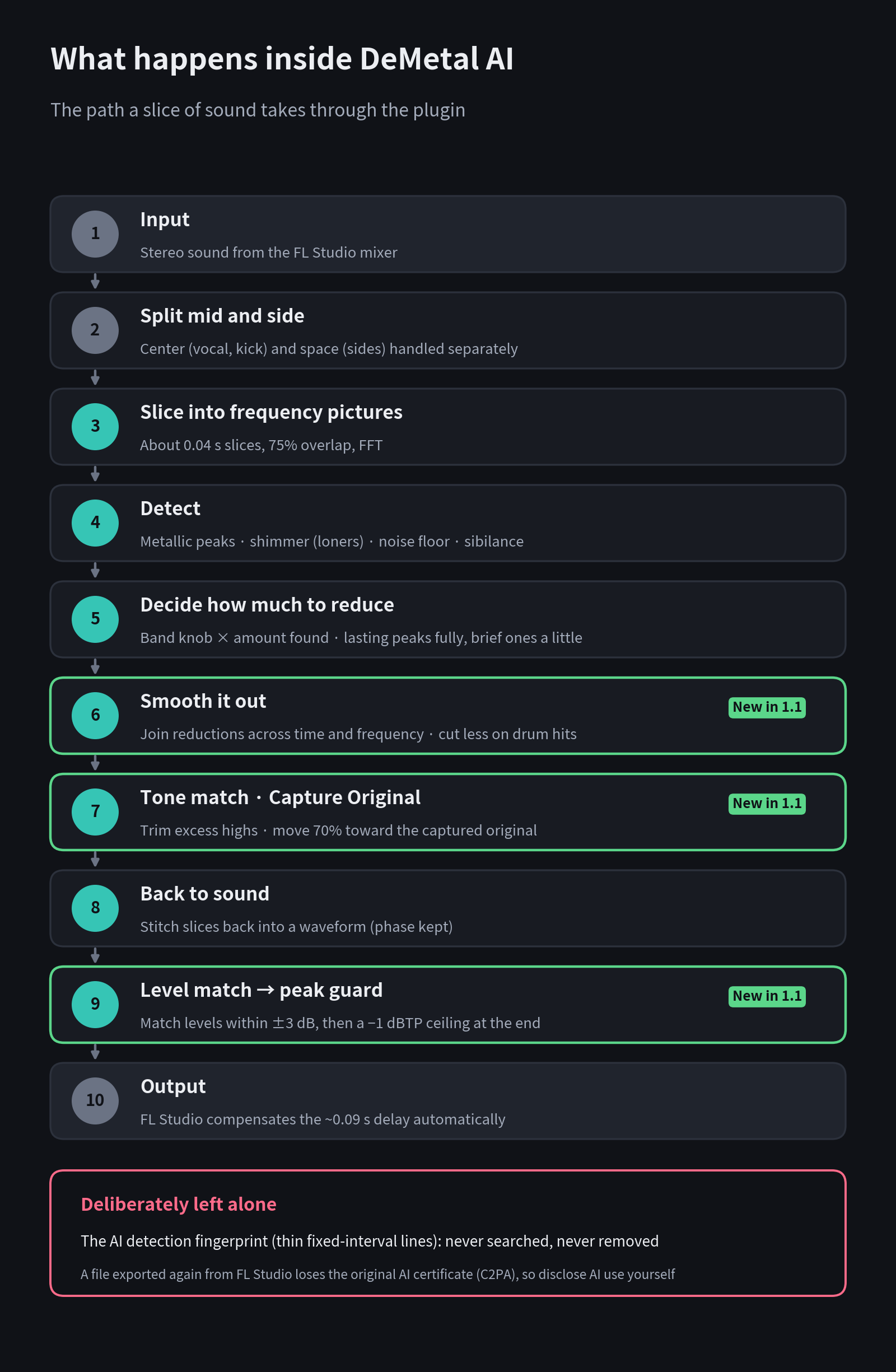
The plugin cuts the incoming sound into pieces about 0.04 seconds long, each overlapping the next by three quarters. Each piece becomes a frequency picture. The plugin decides where to cut, trims those spots and stitches the pieces back into sound. This method is called the short-time Fourier transform (STFT). In effect, it edits the sound while looking at it.
The middle of the stereo image (mid), where the voice and kick live, and the sides (side), which carry the sense of space, are handled separately. In many tracks the fizz gathers at the sides. In the comparison mentioned above, processing only the sides worked best as well.
Finding three things separately
The metallic ring is found as "a narrow peak that sticks out from its surroundings." The reference is the average of the other peaks on either side. At first I compared each peak with the slots right next to it. That flagged the natural harmonics of instruments as metallic too, and in the first test the 2 to 6 kHz range of clean music actually got worse. Only after switching the reference to "other peaks" did the harmonics survive. A peak that keeps sticking out in the same place for more than 1.5 seconds is reduced fully; one that pops up briefly is reduced only a little.
Shimmer is found as "a loner": a point that sparkles on its own without connecting to anything within 0.046 seconds before or after, or to its frequency neighbors above and below. The sound of an instrument almost always continues in time or in frequency. For the noise floor, the plugin gathers the quiet moments, estimates where the floor lies and lowers only what is close to it. Sibilance (s, ch and t sounds) is reduced only at moments when the 5 to 10 kHz range jumps unusually high compared with 1 to 4 kHz. When a drum or hi-hat hits, the plugin processes less to keep the punch.
The most important button: listening to what was removed
At the top of the window there is a "Listen to removed" button. Press it and you hear only what the plugin took out. If all you hear is fizz or metallic ring, you can turn the knob up. If you can clearly hear the melody or the drums, you are cutting into the music, so turn it down. Turn on "Solo this band" as well and you hear only what was removed in that band.
When comparing before and after, turn on "Level match." Even a slightly louder sound fools the ear into hearing it as better. Matching the levels makes the comparison fair.
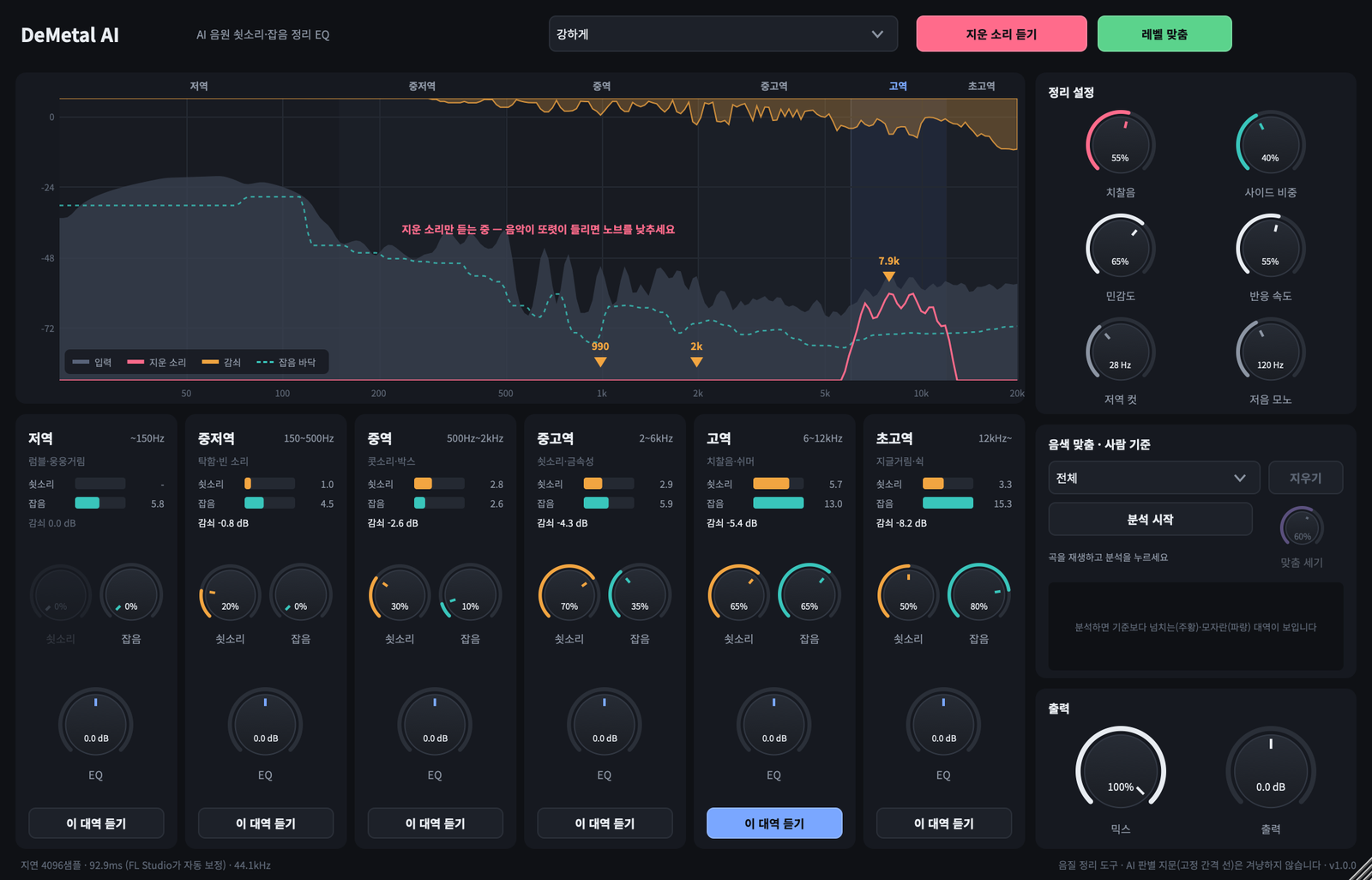
The 1.0 window with "Listen to removed" and the high band's "Solo this band" switched on. The pink line is the removed sound. A notice tells you to lower the knob if you can clearly hear music. 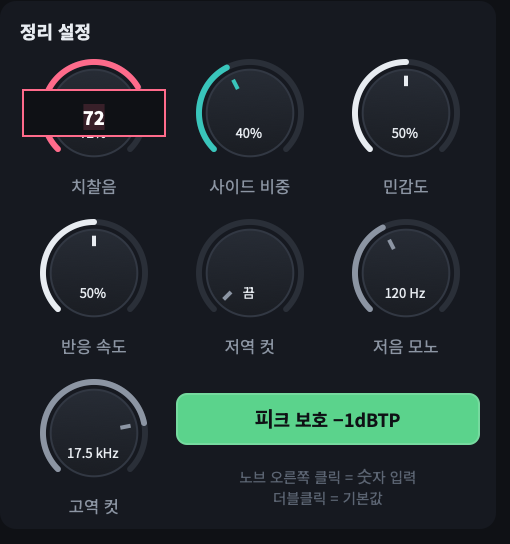
In 1.1 you can right-click a knob and type a value directly. The green button at the lower right is the peak guard.
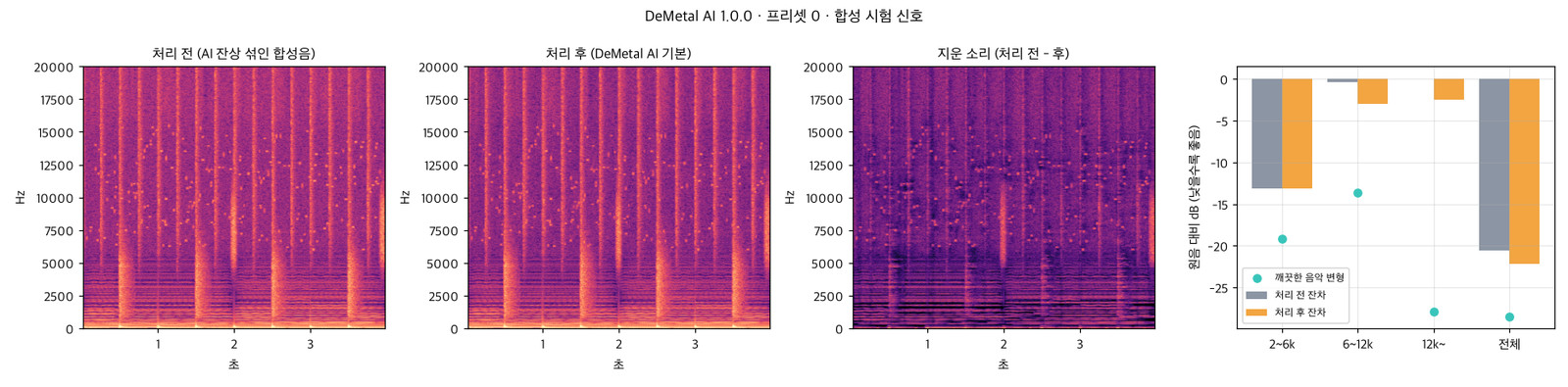
While building 1.0, we also ran a test with a known answer: clean music deliberately mixed with three resonances, a hiss floor, 2,600 shimmer grains and fizz above 16 kHz. In the removed sound after processing, the planted artifacts show up just as they were mixed in.
Leaving the detection fingerprint alone, on purpose
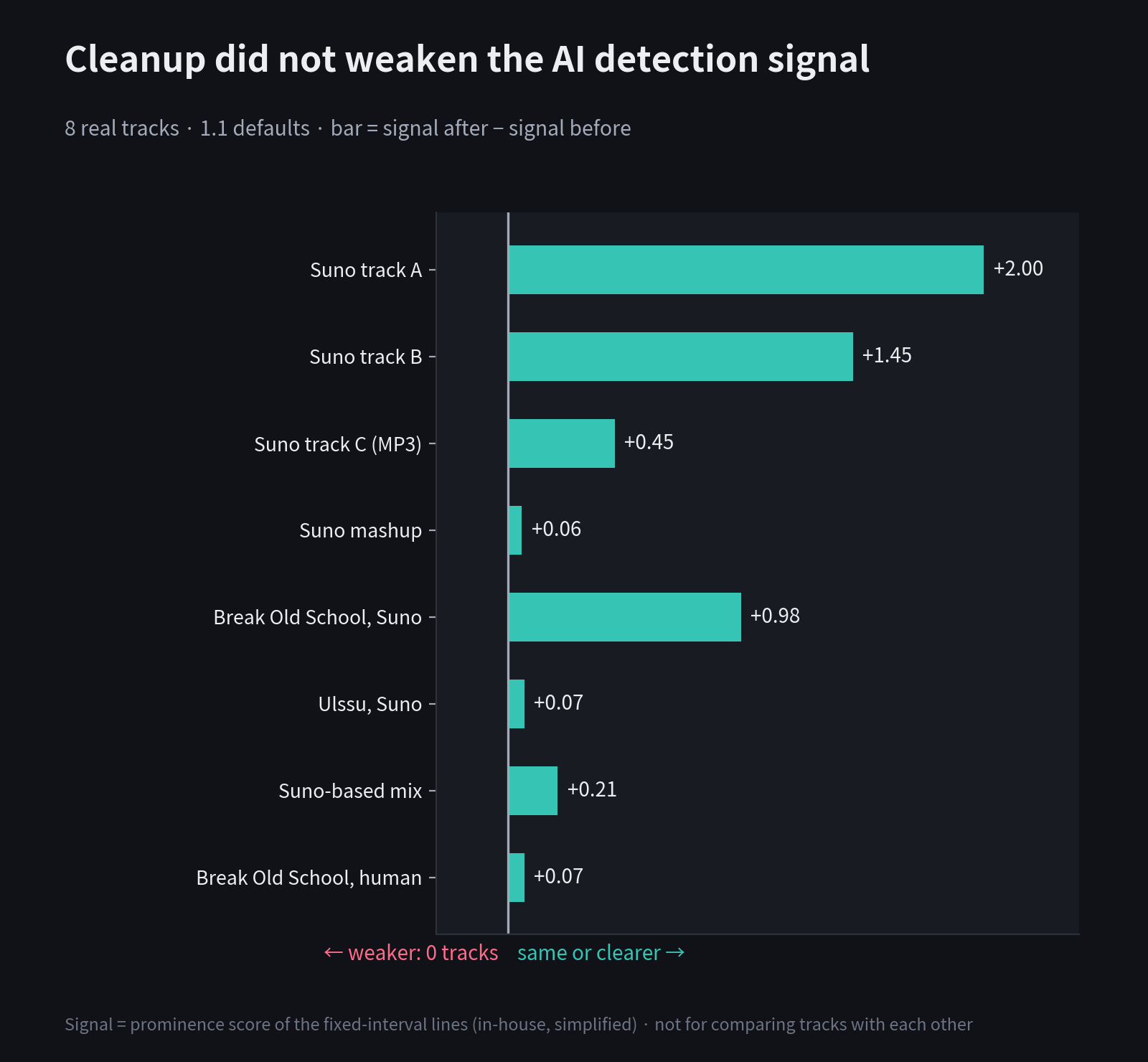
One principle was fixed from the start of the design: the fingerprint used for AI detection, the thin lines at fixed intervals, is neither searched for nor removed. The footer of the window even says so: "Sound-quality cleanup tool · does not target the AI detection fingerprint (fixed-interval lines)" (in Korean). After building 1.1, I checked eight real tracks. Not one showed a weaker detection signal after processing. In many, the signal became slightly clearer as the surrounding noise was cleared away.
The certificate attached to the file (C2PA) is a different story. The moment you export again from FL Studio, the original file's certificate does not carry over. So when you release a cleaned track, you have to state yourself that it was made with AI. The plugin's manual says the same.
Machines tested it first
Before it reached my ears, it had to pass machine tests. With every knob at zero, the output must be identical to the input; the difference was −137.9 dB, effectively zero. The plugin delays the sound by about 0.09 seconds so it can look ahead before deciding. It reports that delay precisely to FL Studio so the track stays in time with the others. It also passed the strictest level of the plugin checker pluginval and Apple's AU validation (auval). The processing load is around 3% of a single core on an M3 Pro Mac.
Three problems in real use, fixed in 1.1 the next day
I installed 1.0 in FL Studio and put it on my songs. It was not what I expected. The speakers sounded like they were tearing, the result sounded messier than the original, and the metallic sound I wanted gone was still there. I passed on exactly what I heard. Claude measured each problem one by one before fixing it.
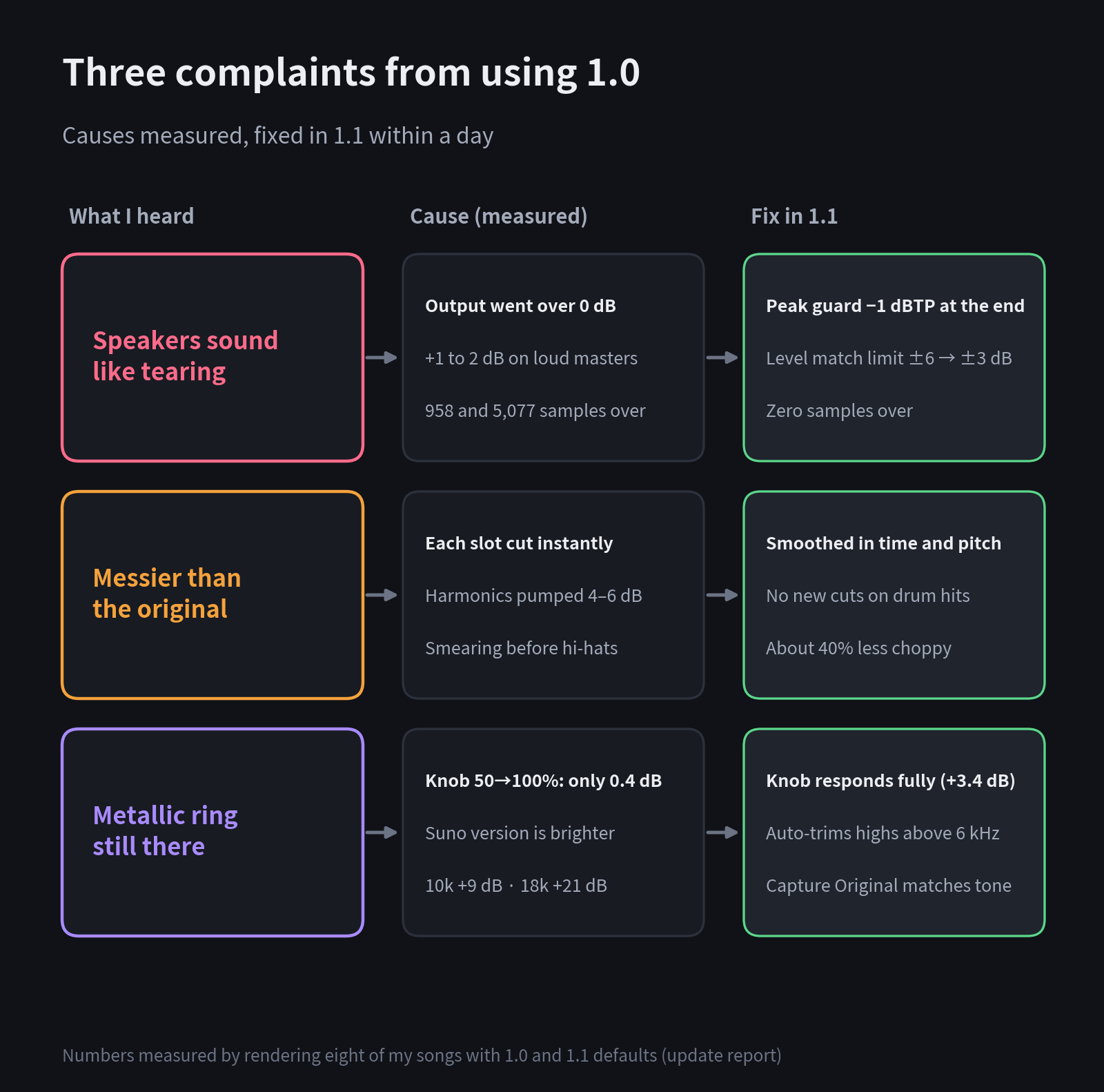
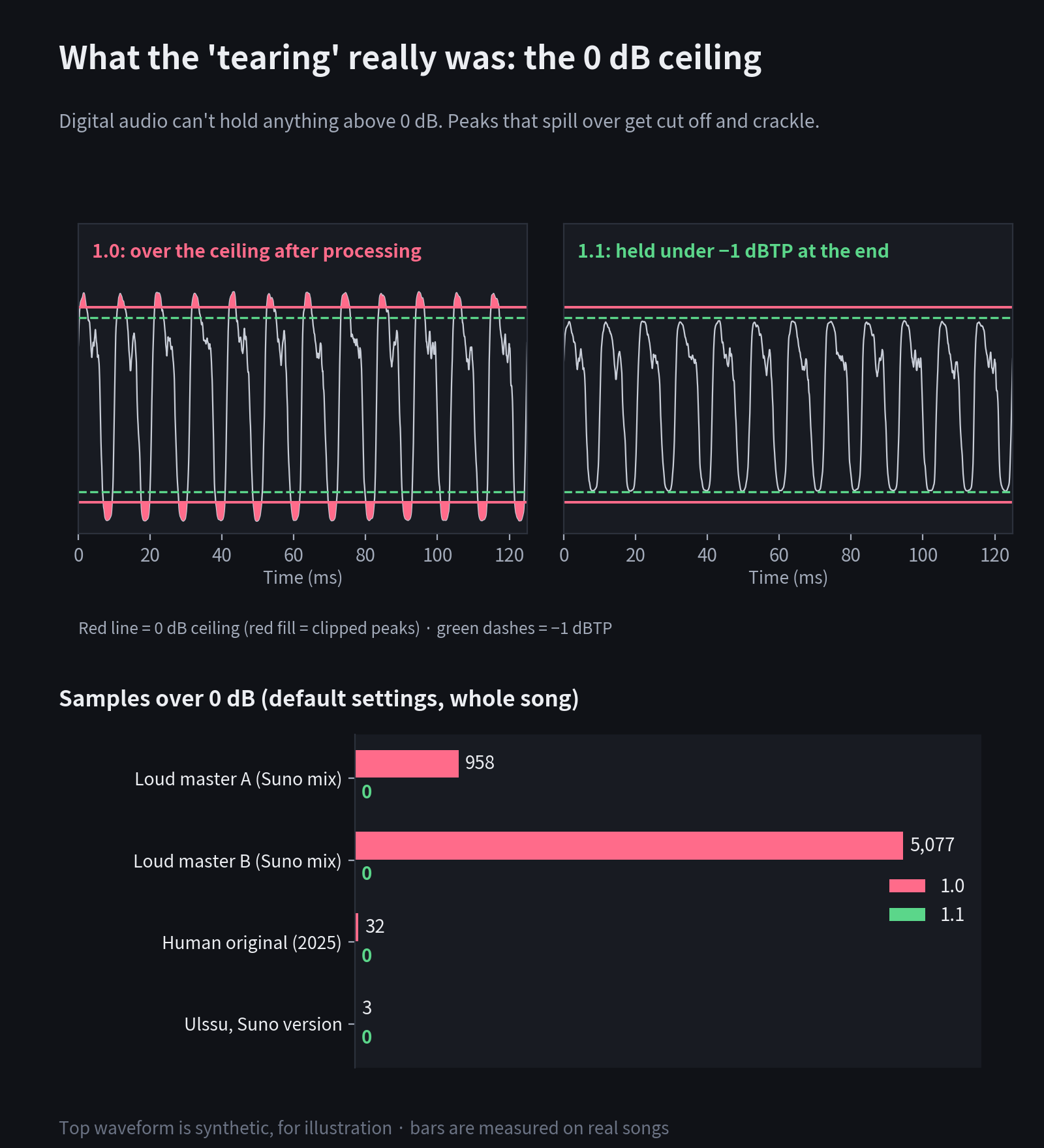
The tearing came from the output going over the 0 dB ceiling. Masters today are made loud, pushed right up against 0 dB from the start. Two of my songs were big masters that already went slightly over the ceiling. On top of that, the "Level match" in 1.0 boosted the processed sound back up by as much as 6 dB, and processing such as mono bass changed the waveform's shape and raised its peaks. As a result, 958 samples went over the ceiling in one song and 5,077 in another. FL Studio can hold that internally, but once it goes out to speakers or a file, it gets clipped into a crackle. Version 1.1 adds a peak guard at the very end. It looks 0.0015 seconds ahead and gently holds the output below −1 dBTP. In the same songs, the number of samples over the ceiling dropped to zero.
The messiness came from how it cut. Version 1.0 set the reduction for each frequency slot anew every 0.01 seconds and applied it immediately. As a result, the harmonics of instruments were cut and released by 4 to 6 dB over and over. Narrow notches also ring on in time, creating sounds just before the hi-hats that were never there. Version 1.1 smooths the amount of reduction across both time and frequency. It does not start new cuts at the moment a drum hits. The reduction became about 40% less choppy.
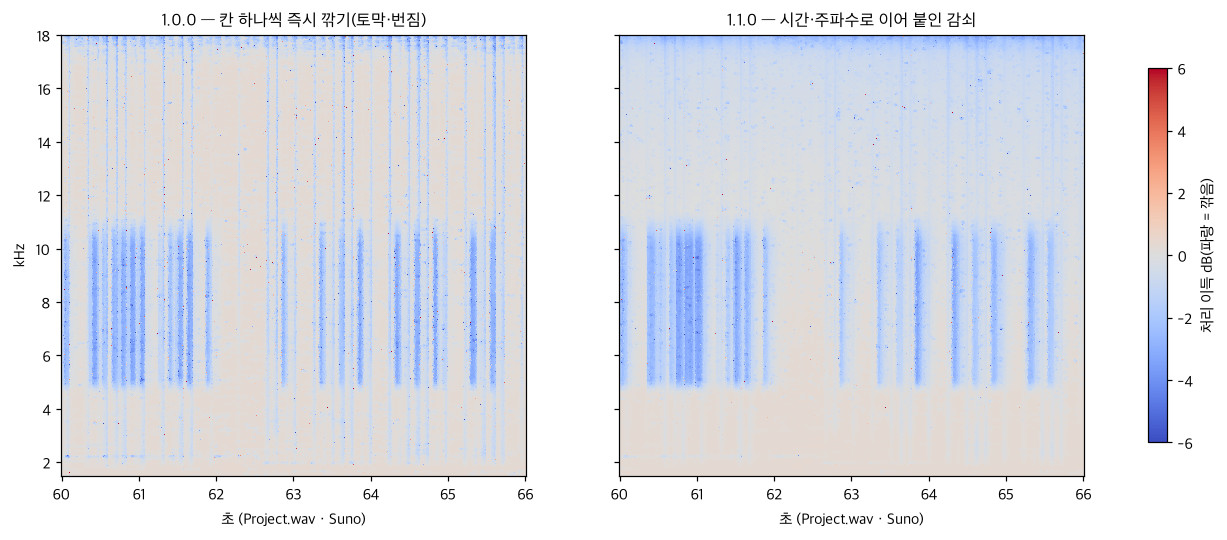
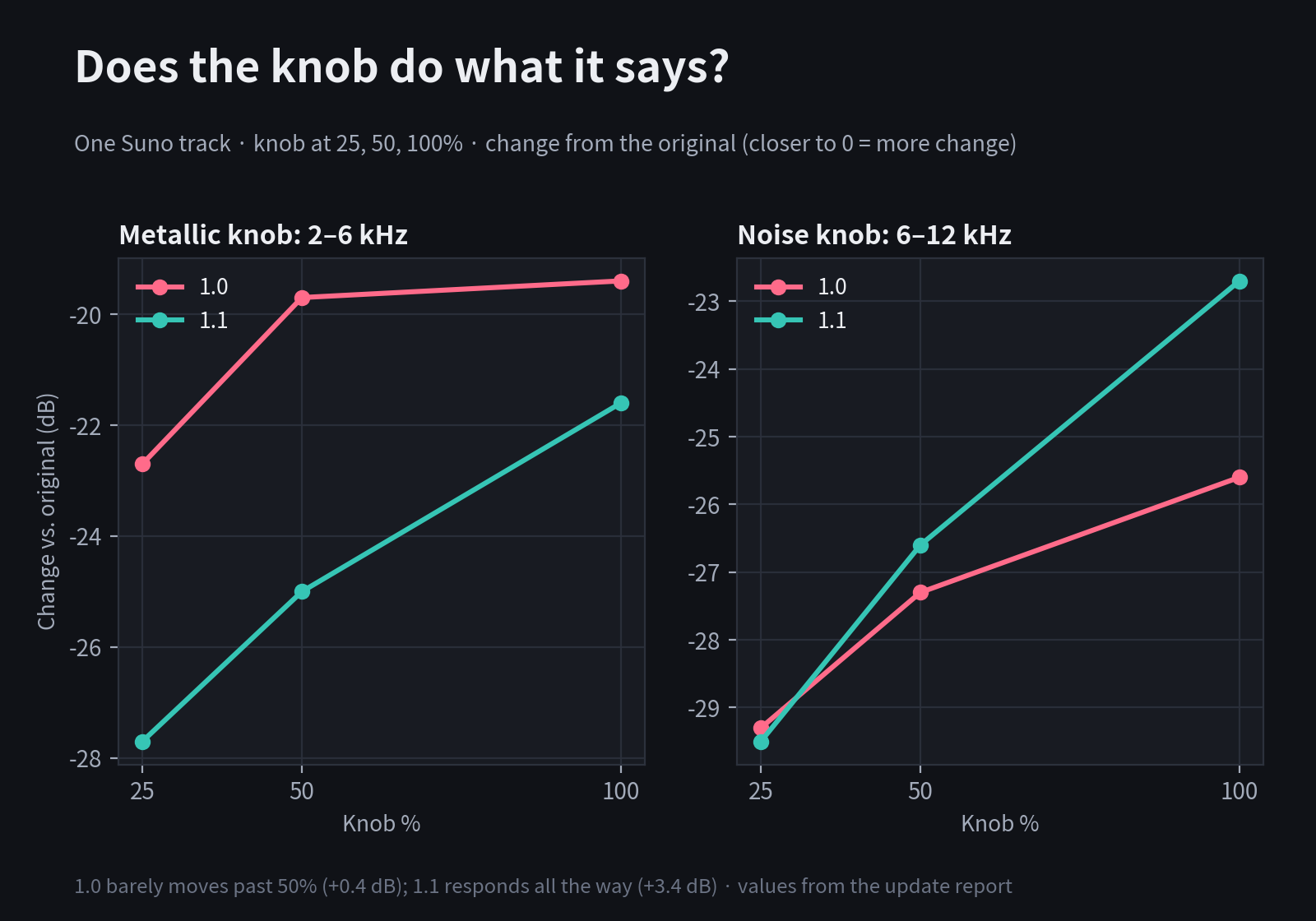
There were two reasons the metallic sound stayed. One was the knob. In 1.0, raising the metallic knob from 50% to 100% changed the result by only 0.4 dB. In 1.1, the same move changes it by 3.4 dB; the knob responds all the way. The other reason went deeper. When I compared the original and the Suno version of the same song, the Suno version was 9 dB brighter at 10 kHz, 15 dB at 14 kHz and 21 dB at 18 kHz. Much of what I had heard as metallic was not narrow peaks but an overall tone that was far too bright up top. Version 1.1 automatically trims the excess highs above 6 kHz.
Part 3 looks beyond my own plugin, at the cleanup tools other people have built and the services that detect AI music.
The DeMetal AI series
- Part 1 · Why someone who worked on detecting AI music set out to remove its metallic sound
- Part 2 · Version 1.0 in a day, and 1.1 the next day (you are here)
- Part 3 · Tools that clean AI music and services that detect it
- Part 4 · A new instrument, or a factory?
- Part 5 · A crackle, changed chords and a different pitch only in FL Studio
Sources
- Comparison test on reducing Suno artifacts (hiropon blog, Japanese, 2026-06-11)
- A Fourier Explanation of AI-music Artifacts (Afchar et al., ISMIR 2025)
- Upsampling artifacts in neural audio synthesis (Pons et al., ICASSP 2021)
Images: the DeMetal AI screens and measurement charts are my own; labels inside the plugin screens and some measurement charts are in Korean. The diagrams and explanatory charts were drawn from synthetic signals and public data.
Words by HongTon_E (TAPE Agency)
#DeMetalAI #AIMusic #Suno #FLStudio #AudioPlugin #AIMusicDetection #MusicProduction #MagTAPE #TAPEAgency
Comments
Loading comments…