
On November 6, a week after I installed DeMetal AI 1.1, a song with the plugin on it started to crackle, its chords seemed to change, and inside FL Studio even the pitch seemed off. Parts 1 to 4 are the record and the thinking up to the end of October. This final part covers the new feature in 1.1 and what Claude and I found when we measured the problems that showed up after a week of use.
Capture Original: for people who remake their own songs
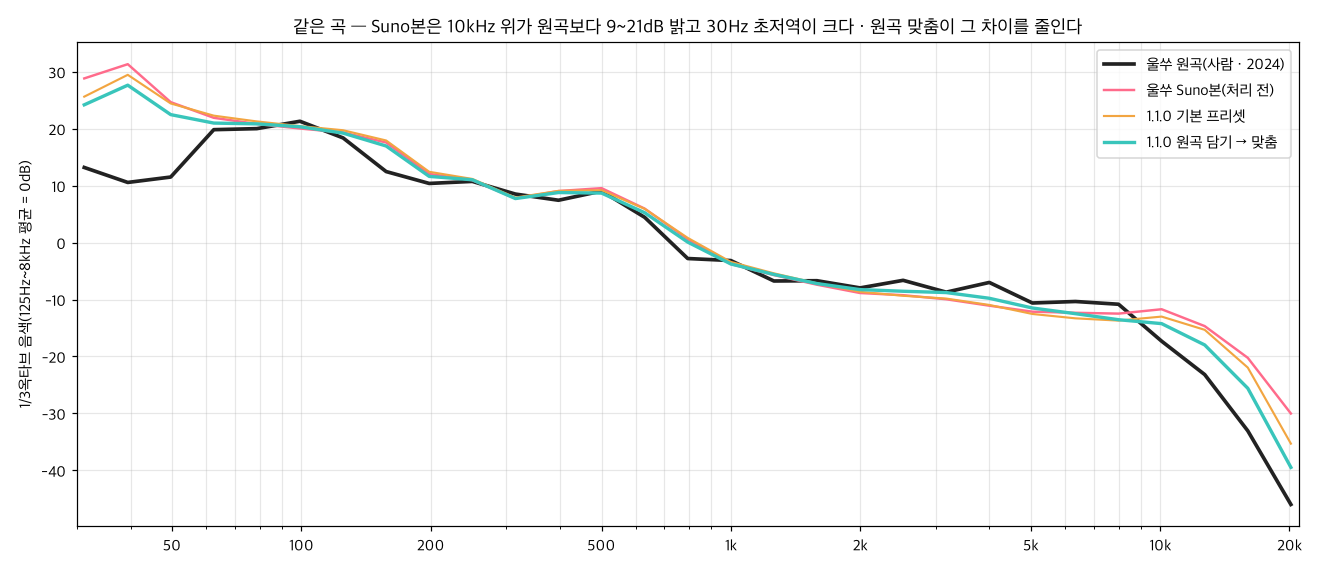
My own workflow is to remake my songs with AI and then refine the result in FL Studio. So I added "Capture Original" to 1.1. Play the original first so the plugin remembers its tone, then play the Suno version, and the plugin moves it 70% of the way back toward the original. On "Ulssu," the tonal distance from the original shrank from 4.52 dB to 3.26 dB. Looking only at 6 to 16 kHz, it went from 7.42 dB to 4.57 dB.
It did not work on every song. On the Suno version of the breakbeat track, which was already close to the original in tone, the default settings actually moved it slightly further away (1.18 dB to 1.54 dB). For songs like that I recommend the "gentle" preset. This was also where I learned that no single setting fits every song.
Beyond that, the number of presets grew to 31. You can choose by vocal range (low male voice, high female voice and so on), by frequency-band problem, or by genre (ballad, trot, hip-hop, EDM, gugak and more).
A week later: a crackle and changed chords
I installed 1.1 in FL Studio and tried it on one song after another. On November 6, something in a song I was working on caught my ear again. With the plugin on, a crackle was still there, and the chords sounded as if they had changed. Listening in FL Studio in real time, even the pitch seemed different. I gave Claude two renders, one with the plugin off and one with it on, plus a screenshot of my FL Studio setup. As before, we measured before fixing anything. There were three causes. One sat before the plugin, one inside it, and one, it seems, in an FL Studio setting.
The crackle was already there before the plugin
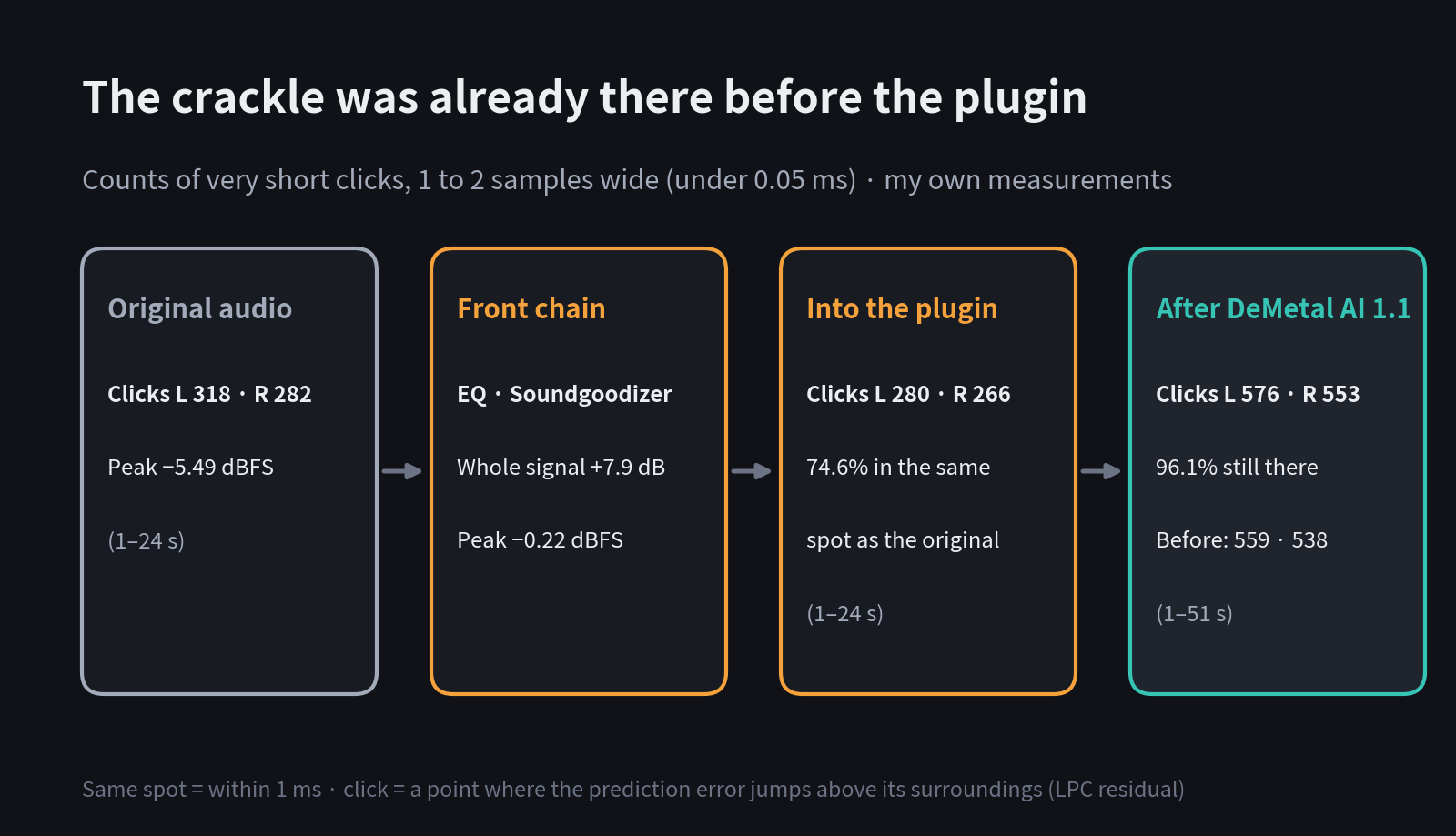
Claude counted every very short click, one or two samples wide, under 0.05 milliseconds. Between the 1-second and 51-second marks of the render with the plugin off, there were 559 on the left channel and 538 on the right, about eleven per second per channel. In the render with the plugin on, 96.1% of them were still in the same places. With every knob at maximum, or with one module switched on at a time, the left-channel count stayed between 541 and 611. The plugin had not made these clicks, and the plugin as it stands could not remove them.
We traced them upstream. In this project, an EQ and Soundgoodizer, the tone-shaping plugin that ships with FL Studio, sat in front of DeMetal AI. The same clicks were already in the original audio file for the same passage: 74.6% of the clicks found after the chain sat in the same places as in the original, within a millisecond. The chain in front made the whole signal about 7.9 dB louder, and the peak rose from −5.49 dBFS in the original to −0.22 dBFS, right against the ceiling. A crackle that had been buried grew louder along with everything else.
Why 1.1 cannot remove them also comes down to its design. The plugin cuts sound into slices of about 0.04 seconds and reads each one as a frequency picture. A click shorter than 0.05 milliseconds is smeared thinly across the whole slice, so in that picture it does not stand apart from anything else. On top of that, 1.1 deliberately leaves broadband and sudden sounds alone to protect drums and hi-hats. The crackle hides behind that protection. Catching it would take more than adjusting the current design. It would need a new stage in front that looks at every sample and patches over the spikes.
Measuring turned up one uncomfortable fact as well. With 1.1 on, the top end drops a little, so it sounds as if the filter is working. On the default setting, 2 to 18 kHz fell by 0.7 to 1.1 dB, but about 0.7 dB of that came from the peak guard turning the whole song down slightly. With the peak guard off, the same bands fell by only 0.1 to 0.6 dB. Much of what I had heard as less metallic sound was simply quieter sound.
Why the chords sounded different
The pitch did not change. The plugin only scales the level of the sound and leaves phase and timing alone. Twelve pure tones from 43 Hz to 4.2 kHz came out with a pitch change of 0 cents. What changed was the balance of loudness between notes.
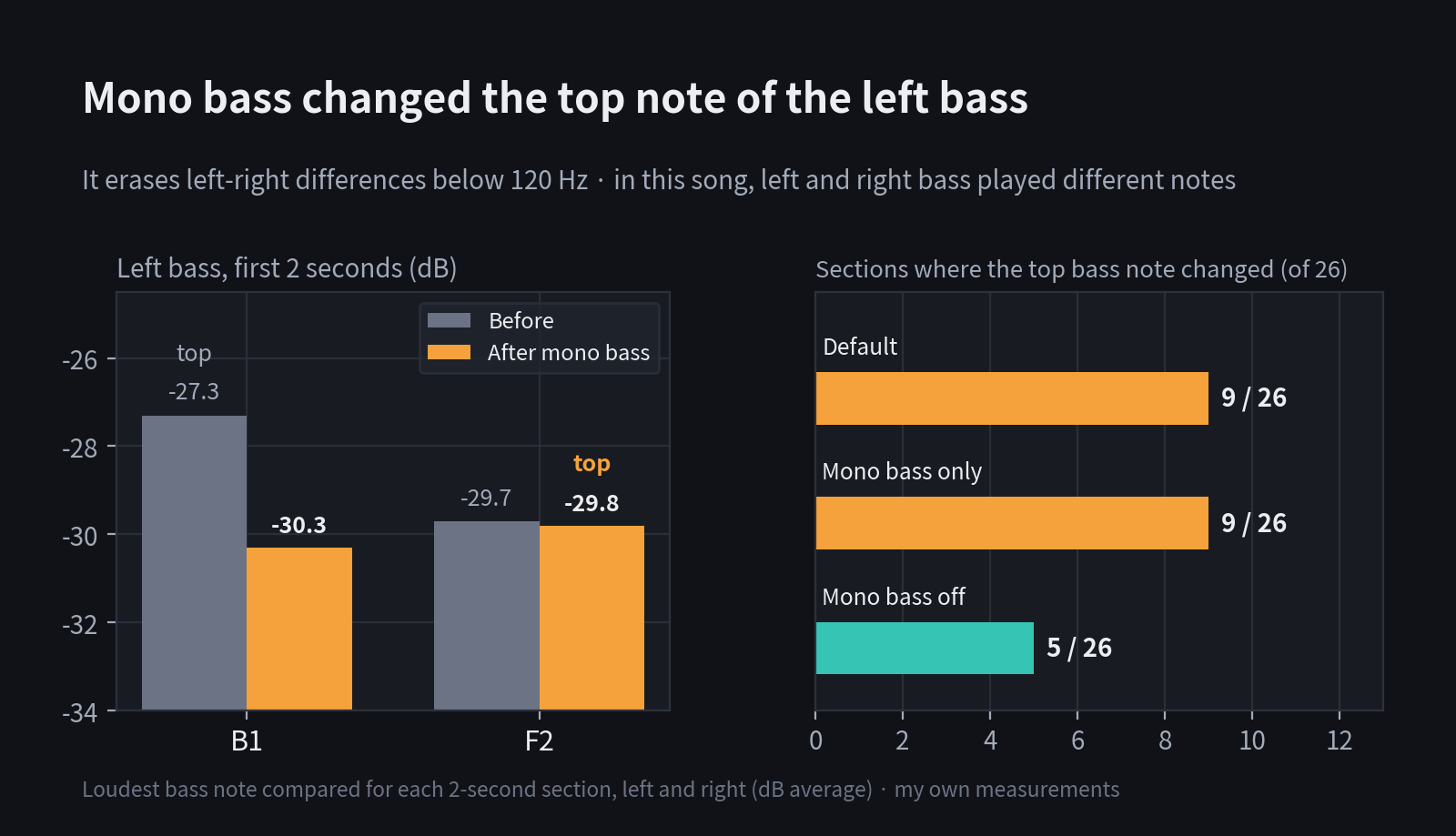
The biggest cause was "mono bass," which erases left-right differences below 120 Hz to pull the low end to the center. It is a common move in club music, so I had left it on by default. In this song, though, the left and right bass lines played different notes. Once the difference was erased, the loudest note in the left-channel bass over the first two seconds switched from B1 to F2. Cut into 26 two-second sections, the song had 9 sections where the loudest bass note on the left or right changed. With only mono bass turned off, that fell to 5.
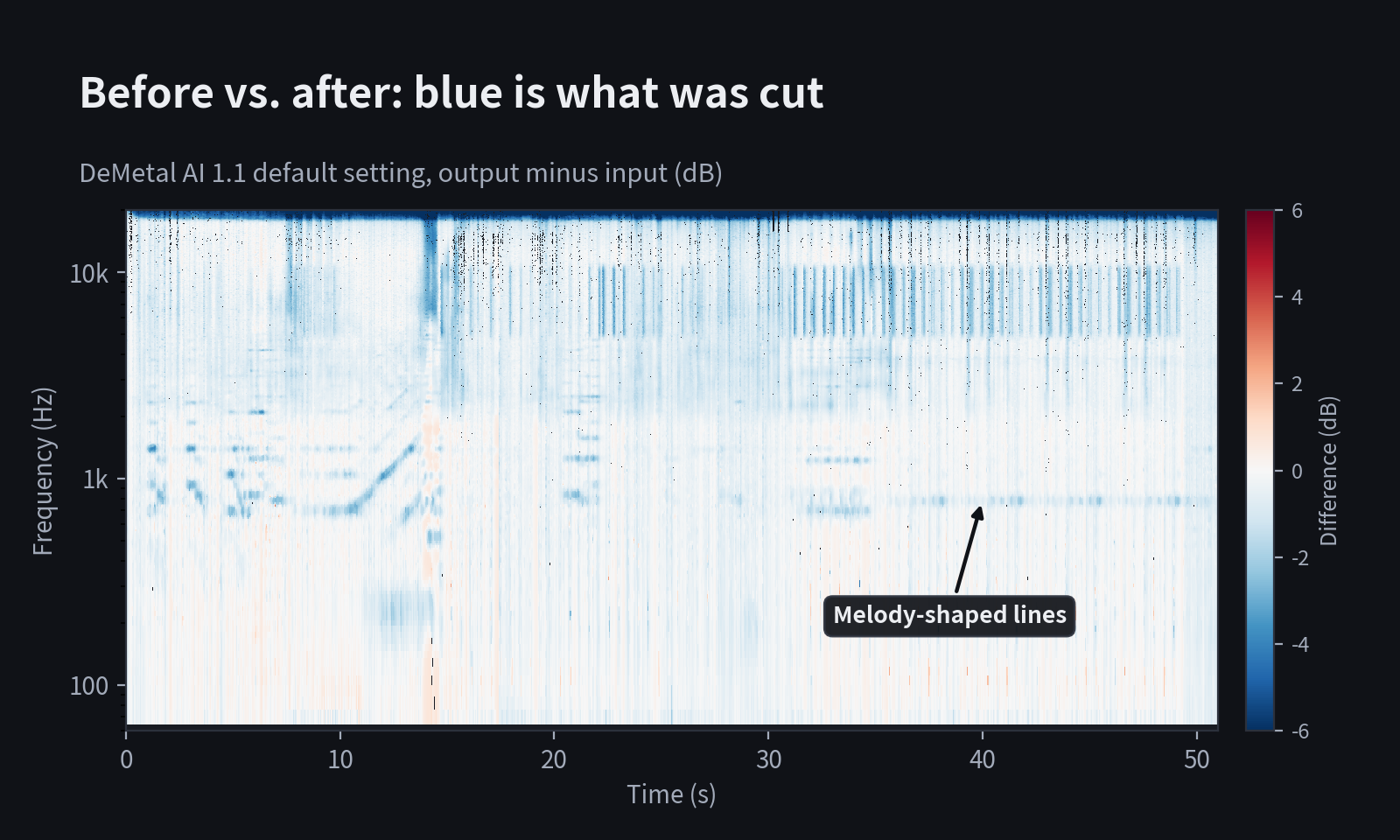
The second cause was the metallic-sound knob in the low-mid and mid bands. It treated the overtones of sustained chords and melody as narrow peaks and cut them. A picture of the difference before and after processing showed horizontal lines in the shape of the melody. Above 200 Hz, the loudest note changed in 10.6% of moments, and in 1.7% with that knob off. The third cause was the song itself. Even before processing, the two loudest bass notes were only a little over 1 dB apart (median 1.25 dB on the left, 1.61 dB on the right), so a small change was enough to swap their order. These percentages count every moment where a near-tie flipped. They are a yardstick for comparing modules, not a measure of how much you would hear.
There is a workaround for now. With mono bass at 0 and the metallic-sound knob at 0% in the low-mid and mid bands, the share of sections where the top bass note changed on either side fell from 18 to 19% to 7 to 9%, and across the full range from about 10% to around 2%. The crackle stayed exactly as it was.
Why the pitch sounded different only inside FL Studio
One puzzle was left. Played one after the other, the two exported files sounded alike, yet in FL Studio, in real time, the pitch sounded different. Nothing inside the plugin explained it. Changing the block size it receives, anywhere from 32 to 4,096 samples, gave the same result.
A number in FL Studio's audio settings did stand out. The buffer length was set to 16 samples, or 0.33 milliseconds. The manual recommends at least 128. The plugin runs a frequency analysis once every 512 samples in a single burst, and one burst took a median of 0.307 milliseconds, 92% of the time a 16-sample buffer allows. Add the other plugins in the chain and it can miss the deadline, and a missed deadline means a dropout. If that dropout repeats every 512 samples, about 94 times a second, it can sound like a crackle or a change in pitch. Exporting to a file has no deadline, so the problem does not occur there, which matches the symptom: the files are the same, FL Studio is not. I have not yet raised the buffer and listened again, so for now this is the most likely hypothesis.
| What I heard | Where the cause is | What to try now |
|---|---|---|
| Crackle | Before the plugin (original audio and front chain) | Lower the gain in front and fix the source |
| Changed chords | Inside the plugin (mono bass, low-mid and mid metallic-sound knobs) | Mono bass at 0, those knobs at 0% |
| Different pitch only in FL Studio | FL Studio buffer of 16 samples (hypothesis) | Raise the buffer to 128 to 512 samples and listen |
Where the record stands
Tracing why the pitch sounded different only in FL Studio is where the record stands for now. Starting with raising the buffer and listening to the same passage again, I will keep checking, with my ears and with the numbers, what needs fixing and where.
Here is what I took away. I built a tool to remove the metallic sound of AI music, and the problems I actually heard came less from AI-made sound than from my own chain, my settings and a feature I had switched on by default. The ear says something is wrong first, and the numbers say where. Without that order, I would have kept turning the wrong knob.
The DeMetal AI series
- Part 1 · Why someone who worked on detecting AI music set out to remove its metallic sound
- Part 2 · Version 1.0 in a day, and 1.1 the next day
- Part 3 · Tools that clean AI music and services that detect it
- Part 4 · A new instrument, or a factory?
- Part 5 · A crackle, changed chords and a different pitch only in FL Studio (you are here)
Sources
Every number in this part is my own measurement, made on my song and my plugin. No outside sources were used.
Figures: the measurement charts and diagrams in this part are my own.
Words by HongTon_E (TAPE Agency)
#DeMetalAI #AIMusic #Suno #FLStudio #AudioPlugin #AIMusicDetection #MusicProduction #MagTAPE #TAPEAgency
Comments
Loading comments…